
Daheng Imaging SDK - Our Free Software for configuring and operating Industrial Cameras
- Wide Compatibility – Supports all our industrial cameras.
- User-Friendly Demo Program – Includes an intuitive graphical interface to easily adjust camera settings.
- Extensive Programming Examples – Helps developers integrate cameras efficiently into their applications.
- Multiple Versions Available – Download the latest SDK version from our official download area.
Designed for flexibility and ease of use, the Daheng Galaxy SDK ensures seamless camera control, making it ideal for industrial automation, machine vision, and embedded applications.
Download the SDK today and unlock the full potential of your industrial camera!
Supported Operating System
The Daheng Imaging SDK supports the following operating systems:
| Operating System | Recommended System Version | SDK | Interface |
|---|---|---|---|
|
Windows |
Windows 7/10/11 |
|
|
|
Linux |
Ubuntu 12.04 or above, kernel version 3.5.0.23 or above |
|
|
|
Android |
Android 7.2~14 |
Android ARM |
USB3.0 |
Note: Apple macOS is not natively supported. While macOS is not common in industrial environments, many developers use Apple systems for software development. In such cases engineers can install a Windows or Linux virtual machine on their Mac to use our industrial cameras with Daheng Imaging SDK.
Windows
The Daheng Galaxy SDK is fully compatible with Windows, making it easy to get started with our USB3 and GigE cameras. Installation and configuration are designed to be straightforward, even for first-time users.
To streamline the process, we recommend following our QuickStart guide: 5 Steps to Easily Install a Machine Vision Camera and Acquire an Image. This step-by-step tutorial walks you through everything from software installation to capturing your first image, ensuring a smooth and efficient setup experience.
Linux
- Linux X86 -> The Daheng Galaxy SDK is a powerful solution for managing industrial cameras on Linux systems with x86 architecture. Whether you're setting up for development or deployment, the installation and configuration process is clearly outlined in our guide: How to Install Galaxy SDK for x86-Based Devices and Get Your Industrial Camera Running on Linux This resource covers the full setup process, including camera configuration, image acquisition using both Galaxy View and the C++ SDK, and tips to ensure smooth operation across your system.
- Linux ARM -> For embedded systems and edge computing applications, the Daheng Galaxy SDK also supports ARM-based hardware. This includes popular development platforms such as: NVIDIA Jetson Series: Jetson TX1, TX2, Jetson Nano, Jetson Xavier. Raspberry Pi: These compact, high-performance platforms are ideal for industrial vision projects where size, efficiency, and computing power are key. For comprehensive troubleshooting tips and performance optimization resources, please visit our articles on How to install Raspberry Pi with our USB 3.0 Camera
Supported Programming Languages
The Daheng Imaging SDK provides example programs in multiple programming languages, making integration easy for developers. Please visit our Download Page for more details.
Included Languages: C++, C# (.NET) and Python
Additional Languages (Available on Request): Visual Basic & Delphi
(These are not included in the standard SDK but may be provided upon request.)
Note:
Windows:
The supported versions of the .NET Framework are .net 3.5 /.net 4.0, using the GxIAPINET.dll file in the corresponding directory. The supported versions of .NET Core are .net 6.0 and above (requires the .net 6.0 runtime environment to be installed), using the GxIAPINET.dll file located in the .net 6.0 directory.
Linux x86:
The current Linux installer supports .net 6.0 and above on 64-bit systems (requires the .net 6.0 runtime environment to be installed). First install the latest Linux installer and the .net development environment before proceeding with the development.
Software
To integrate our cameras with the software listed above, please refer to the user manual available on our Third Party Software blog.
Explore Galaxy Viewer
Galaxy Viewer is the primary software for testing and configuring our industrial cameras. It allows users to adjust and save camera settings, as well as capture and store images efficiently. The software also supports multiple plugins, offering additional features such as crosshairs, grids, and LUT (Look-Up-Table) adjustments for enhanced functionality.

Exploring Galaxy Viewer Features
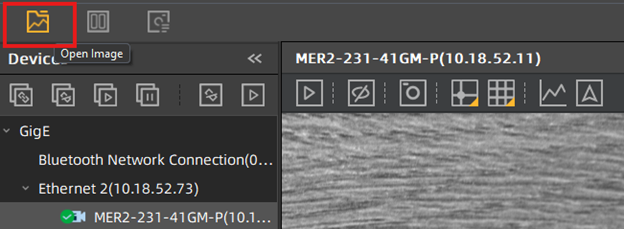
Opening images
You can review images directly in Galaxy Viewer, which is useful for inspecting details such as RGB value in specific areas.
Saving Images
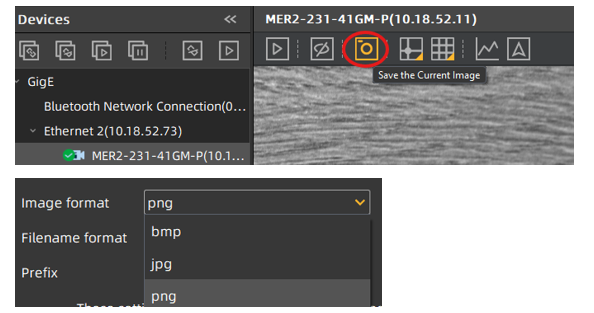
- To save an image:
- Click the save image icon:
- Choose your preferred file format and filename.
Recommendations: Save images as .PNG to reduce file size while maintaining high quality
Tile View
If multiple cameras are connected, you can split the screen using the Tile View tool to display multiple camera feeds in a single window.

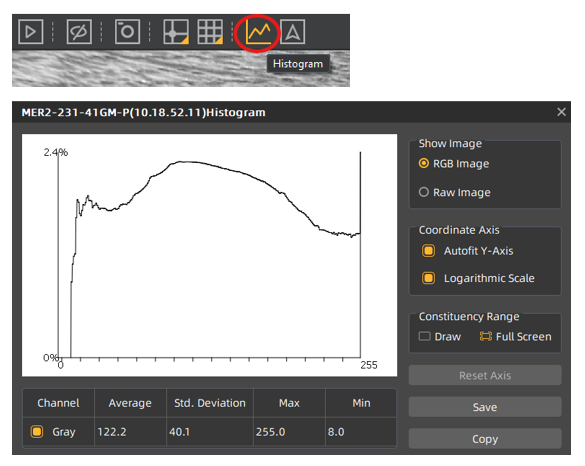
Histogram
Enable or disable the image histogram, which provides an overview of the image's brightness and contrast level.
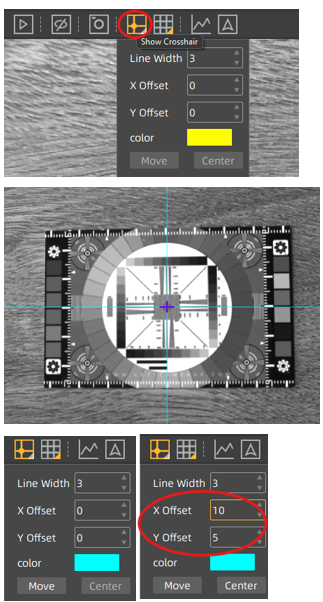
Crosshair
Click the Crosshair button to overlay a crosshair in the center of the image. To reposition the crosshair: Adjust the line width and offset values. Use negative values to move left or up (e.g., [-200, -50]).
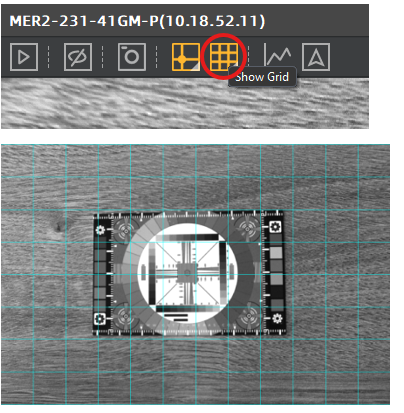
Grid
Enable the Grid feature by clicking its icon. To customize the grid: Choose between High, Default or Low grid density (higher values create more grid lines). It is also possible to have a custom set value.
Helpful Articles for the Daheng SDK
To learn more about the features of Galaxy Viewer, our Knowledge Center is filled with helpful articles to guide you. If you want to explore Galaxy Viewer, our powerful sofwtare for configuring and operating industrial cameras, please visit: Daheng Galaxy Viewer.
Helpful Articles:
Structure of Downloads
Windows SDK – V2.4.2503
Galaxy viewer: GalaxyView.exe
IP configurator: GxGigEIPConfig.exe
Programming samples: Development\Samples
[C++, C# (.Net), Direct Show, LabVIEW, Python, VC]
Windows Runtime SDK – V2.4.2504
Linux ARM SDK – V1.5.2303
Galaxy viewer: /Galaxy_camera/bin_armv8/GxViewer
IP configurator: /Galaxy_camera/bin_armv8/GxGigeIPConfig
Download contains the corresponding Python SDK
Python SDK: /api/gxipy
Python samples: /sample
Linux x86 SDK – V2.4.2503
Galaxy viewer: Galaxy_camera/bin/GalaxyView
IP configurator: Galaxy_camera/bin/GxGigeIPConfig
Download contains the corresponding Python SDK
Python SDK: /api/gxipy
Python samples: /sample
C++ samples: /sample
Reviews VA Imaging
-
10Absolutely thrilled
I am absolutely thrilled with the MER2-160-227U3M camera I purchased from VA-Imaging. The camera exceeds my expectations in every way. The image quality is sharp and clear, even with fast movements. Installation was straightforward. VA-Imaging's customer service was also outstanding. They were very helpful in answering my questions and delivered the camera quickly and securely.
-
8Cameras are a great value for money
The cameras are a great value for money and the lenses also. The software is outdated and needs refreshing. It took me considerable amount of time to discover how to access the camera features.
-
10Easy to deal with
Its a pleasure to contact with the sales department. They are very polite and always ready to help. Our orders are always delivered on time and the communication is easy and simple. High quality products.
-
10embedded camera
We initially explored several embedded vision camera and USB3 camera options for our application. Our main priorities were compact dimensions and keeping the required software development to a minimum. We selected a VEN-161 boardlevel camera. It was easy to integrate and USB3 Vision interface allowed our software team to get started quickly. The sales guy was very helpful with selecting the hardware for us. We are happy that we selected the USB3 board-level camera instead of a Mipi embedded vision camera as we didn't require now the additional driver development.
-
10Excellent
It was easy and quick process from ordering to receiving. One personal message from the team is making it even better. Thanks
-
10Excellent quality material and attentive and reliable supplier
In the commercial phase we had maximum support and delivery times were respected. The material is quite good with low and competitive costs.
Vision & Automation Resources
-
FAQ pageFAQ
Most common questions are already answered on our FAQ page. Questions about delivery times, warranty, loan, returns, longevity, manuals etc.
-
DiscoverImaging Software
Image processing software captures the images from an industrial camera and performs complex image processing tasks like segmentation, detection, code and text reading.
-
DiscoverKnowledge Center
We share our machine vision knowledge in our knowledge center. Find tutorials how to connect cameras, install software & program I/O.
-
DiscoverMachine Vision Applications
Check how our customers use our industrial cameras, lenses and lighting in their application
-
Talk to usMachine Vision Experts
Ask our machine vision experts! We answer rapidly and think along with your imaging project.
-
DiscoverDownloads
The download page provides access to product documentation, software, drivers, manuals and technical resources for industrial cameras and machine vision components.