Computer vision software for image processing collection

Computer vision software for image processing

Computer vision software connects industrial cameras to automated inspection, measurement, identification, and process control. With our office in Charlotte, North Carolina, VA Imaging Inc. helps engineers, system integrators, and OEMs across the United States select camera SDKs, image processing software, recording tools, and compatible machine vision components.
Open Source Computer Vision Software


Open source computer vision software provides editable libraries and tools for building customized image processing applications. One of the best-known options is OpenCV, which is widely used in research, prototyping, OEM development, robotics, and custom automation projects. OpenCV is primarily used with C++ and Python, with additional bindings and integration options available for other programming environments. Open-source software gives developers a high level of flexibility but generally requires programming knowledge and an understanding of computer vision principles. Please note that we provide an online guide how to use our cameras with the open-source software, but we do not provide technical support on the open-source software itself. For support, please use the support forums of the open-source software.

Types of Computer Vision Software for Industrial Cameras

Computer vision software for industrial cameras includes camera SDKs, graphical development environments, open-source libraries, recording tools, and third-party machine vision platforms. Each software type serves a different purpose. The right option depends on whether the user needs basic camera control, custom software development, a graphical inspection environment, video recording, or integration with an existing engineering platform.

  • Camera SDKs provide the drivers, libraries, documentation, and examples needed to control an industrial camera and develop a custom application.

    VA Imaging Inc. offers a Daheng Imaging SDK for compatible 2D industrial cameras and an Ensenso SDK for compatible 3D stereo vision cameras. These SDKs can be used to acquire images, configure camera settings, and integrate camera control into a larger software application.

    The Daheng Imaging SDK includes Galaxy Viewer, a graphical camera configuration program that helps users connect to a camera, view live images, and adjust camera parameters. Developers can also use the available programming examples to begin building a customized application.

    Read the Knowledge Center guide about using Daheng Galaxy Viewer to program industrial cameras.

    The Ensenso SDK is designed for compatible 3D stereo vision cameras. It provides the software tools required to operate the cameras, generate 3D data, and integrate the camera into custom 3D vision applications.

    Before selecting an SDK, verify:

    • Camera series and model
    • Operating system
    • Processor architecture
    • Programming language
    • Required camera functions
    • 2D or 3D processing requirements
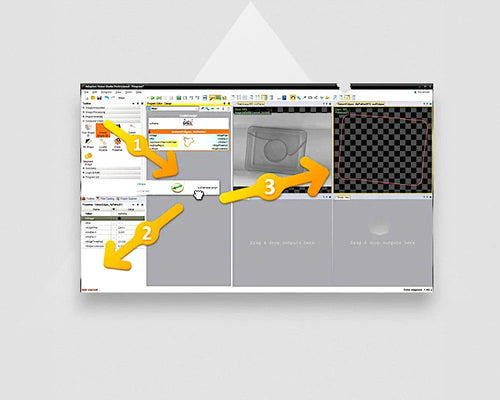
  • Zebra Aurora Vision is a graphical machine vision environment for developing industrial inspection and automation applications.

    The software uses a dataflow-based development method. Users can combine prebuilt image processing tools without creating the entire application from the
    beginning in conventional programming code.

    The Zebra Aurora Vision portfolio includes several options:

    Aurora Vision Studio: A graphical development environment for building and testing machine vision applications.

    Aurora Vision Library: Image processing functions that can be integrated into C++ and .NET applications.

    Aurora Vision Deep Learning:
    Optional deep learning tools for applications such as classification, segmentation, anomaly detection, and OCR.

    Graphical software can be suitable for machine vision engineers who want to develop customized inspections while reducing the amount of conventional programming
    required.

    Development licenses, runtime licenses, and optional modules may be required depending on the selected software package and deployment setup.

  • Recording and diagnostic software captures image streams for troubleshooting, process
    analysis, and research.

    2ndLook recording software from IO Industries can be used with compatible industrial GigE Vision and USB3 Vision cameras. It is intended for continuous recording, image stream review, and diagnostic work rather than the development of a complete automated inspection application.

    • Recording software can be useful for:
    • Monitoring production processes
    • Investigating intermittent machine problems
    • Recording laboratory experiments
    • Reviewing high-speed events
    • Saving industrial camera image streams
    • Collecting image data for later analysis

    The required storage capacity depends on the image resolution, frame rate, recording duration, compression method, and number of cameras.

  • Open source computer vision software provides editable libraries and tools for building customized image processing applications.

    One of the best-known open-source libraries is OpenCV. It is frequently used in research, prototyping, OEM development, robotics, and custom automation projects.

    OpenCV is primarily associated with C++ and Python, with additional bindings and integration options available for other programming environments. It includes functions for tasks such as:

    • Image filtering
    • Feature detection
    • Edge detection
    • Pattern recognition
    • Object detection
    • Calibration
    • Measurement
    • Image transformation
    • Video analysis

    Open-source software gives developers a high level of flexibility, but it normally requires programming knowledge and an understanding of computer vision principles. Technical support is generally provided through documentation, online
    communities, and developer forums.

    VA Imaging Inc. can provide information about connecting compatible cameras to open-source software. Custom programming and support for the open-source platform itself remain the responsibility of the developer or software provider.

  • Third-party machine vision platforms provide established tools for image acquisition, inspection development, measurement, and automation.

    Compatible industrial cameras may be integrated into software environments such as:

    • MVTec HALCON
    • Cognex VisionPro
    • MATLAB
    • LabVIEW

    These platforms serve different users and development requirements. Some provide extensive machine vision libraries, while others are designed for engineering analysis, automation programming, or custom application development.

    Camera integration may require a manufacturer driver, SDK, GenTL producer, or dedicated interface package. The exact installation process depends on the camera, operating system, and selected software version.

    VA Imaging Inc. provides third-party machine vision software guides for connecting compatible industrial cameras to commonly used platforms.

    Docker may also be used as part of a computer vision deployment workflow. Docker is not an image processing platform itself, but it can help package an application and its dependencies into a consistent software environment.

  • Specialist computer vision software supports focused applications such as motion analysis, microscopy, surveillance, and stereoscopic imaging.

    Kinovea, for example, is primarily designed for motion analysis. When combined with a
    suitable high-frame-rate camera, it can be used to review movement, track
    positions, and analyze recorded sequences in research and quality control
    applications.

    Other specialist programs may be intended for:

    • Microscopy
    • Scientific imaging
    • Camera surveillance
    • High-speed recording
    • Stereoscopic visualization
    • 3D point cloud processing

    These programs should be selected based on their intended application rather than
    treated as complete industrial inspection platforms.

What Can Computer Vision Software Do?

Computer vision software can inspect, measure, identify, position, and classify objects using images captured by an industrial camera. The available functions depend on the selected software platform, license, installed modules, camera, and processing hardware.

Inspection and Defect Detection

Inspection and defect detection software identifies whether a product meets defined visual requirements.

  • Checking whether a component is present
  • Detecting missing screws or connectors
  • Verifying product assembly
  • Identifying surface damage
  • Detecting contamination
  • Checking shape or orientation
  • Confirming packaging completeness
  • Producing pass/fail results

Rule-based image processing is often suitable when product features and tolerances can be clearly defined.

Measurement, Positioning, and Robot Guidance

Measurement, positioning, and robot guidance software calculates object dimensions, locations, and orientations from image data.

  • Edge detection
  • Distance measurement
  • Angle measurement
  • Diameter measurement
  • Pattern matching
  • Coordinate calculation
  • Alignment verification
  • Robot pick position calculation

Reliable measurement requires the correct camera resolution, lens, working distance, calibration method, and lighting setup.

Barcode, Data Matrix, and OCR

Barcode, Data Matrix, and OCR software reads machine-readable codes and printed or marked characters.

  • Product identification
  • Batch tracking
  • Serial number verification
  • Label inspection
  • Date code reading
  • Traceability
  • Text verification

Image quality is especially important for small, low-contrast, damaged, distorted, or reflective markings.

Classification, Segmentation, and Deep Learning

Classification, segmentation, and deep learning software analyzes visual variation that may be difficult to describe with fixed rules.

Classification assigns an object to a category, segmentation identifies relevant pixels, and object detection identifies and locates objects in an image.

  • Complex defect inspection
  • Product sorting
  • Material classification
  • Anomaly detection
  • Irregular object detection
  • Difficult OCR applications

Deep learning can also be combined with conventional image processing for further measurement or verification.

How to Choose Computer Vision Software

Choosing computer vision software starts with the inspection task, camera interface, operating system, development method, and deployment requirements. The most advanced platform is not automatically the best option. The software should match the application, available engineering knowledge, implementation schedule, and long-term support requirements.

Define the Image Processing Task

Defining the image processing task determines which software functions are required.

  • Inspect a product
  • Measure a feature
  • Read text or codes
  • Detect an object
  • Determine object coordinates
  • Guide a robot
  • Analyze motion
  • Record an image stream
  • Process 3D point clouds
  • Classify products or defects

The required feature must be visible in the captured image. Software cannot reliably detect information that the camera, lens, and lighting do not make visible.

Choose Graphical or Code-Based Development

Graphical or code-based development determines how the computer vision application will be created and maintained.

Graphical platforms can offer:

  • Faster initial development
  • Reusable processing tools
  • Visual debugging
  • Reduced programming requirements
  • Easier modification by machine vision engineers

Code-based libraries and SDKs can offer:

  • Greater customization
  • Integration into existing applications
  • Control over the software architecture
  • Options for OEM deployment
  • Flexibility for specialized algorithms

The preferred method depends on the development team, required functionality, and future maintenance plan.

Check Camera and Operating System Compatibility

Camera and operating system compatibility determines whether the software can acquire images and control the required camera functions.

  • Industrial camera model
  • GigE Vision or USB3 Vision interface
  • Windows or Linux support
  • Processor architecture
  • Required programming language
  • Available driver or SDK
  • Pixel format
  • Triggering support
  • Required frame rate
  • Number of cameras
  • Multi-camera synchronization
  • 2D or 3D image support

Compatibility should be confirmed for the complete configuration rather than for the camera interface alone.

Compare Licensing, Deployment, and Support

Licensing, deployment, and support affect the total cost and long-term use of computer vision software.

  • Free SDK
  • Open-source license
  • Development license
  • Runtime license
  • Subscription
  • Per-device license
  • Optional software module
  • Trial license

A development license may be needed to create an application, while separate runtime licenses may be required for each production system. Verify whether additional modules are needed for OCR, 3D processing, deep learning, or other specialist functions.

FAQ ABOUT COMPUTER VISION SOFTWARE

  • Computer vision software is software that acquires and analyzes images so an automated system can inspect, measure, identify, position, or classify objects. It works with an industrial camera and processing hardware to convert visual information into a usable result, such as a measurement, object coordinate, barcode value, or pass/fail decision.

  • The difference between machine vision and computer vision software is primarily the application context. Computer vision is the broader technology used to extract information from images. Machine vision generally refers to the use of computer vision in industrial inspection, measurement, automation, and production control.

  • Computer vision software can be free, open source, commercially licensed, or offered through a combination of development and runtime licenses. Camera manufacturers may provide a free SDK, while advanced graphical platforms, deep learning modules, and runtime deployments may require paid licenses.

  • The difference between an SDK and image processing software is that an SDK primarily provides camera control and programming access, while image processing software provides tools for analyzing images.

    An SDK may allow a developer to acquire and save an image, adjust exposure, or activate a trigger. Additional algorithms are then required to inspect, measure, recognize, or classify the object in the image.

  • Computer vision software can control the camera when the software supports the required camera driver, SDK, API, or standard interface. Depending on compatibility, the software may control exposure, gain, triggering, frame rate, pixel format, resolution, and region of interest.

  • One industrial camera can work with different software platforms when each platform supports the required camera connection method. Compatibility may be provided through the manufacturer SDK, a GenTL producer, a dedicated driver, or a standard such as GigE Vision or USB3 Vision.

Reviews computer vision software

  • 10
    Absolutely thrilled

    I am absolutely thrilled with the MER2-160-227U3M camera I purchased from VA-Imaging. The camera exceeds my expectations in every way. The image quality is sharp and clear, even with fast movements. Installation was straightforward. VA-Imaging's customer service was also outstanding. They were very helpful in answering my questions and delivered the camera quickly and securely.

  • 8
    Cameras are a great value for money

    The cameras are a great value for money and the lenses also. The software is outdated and needs refreshing. It took me considerable amount of time to discover how to access the camera features.

  • 10
    Easy to deal with

    Its a pleasure to contact with the sales department. They are very polite and always ready to help. Our orders are always delivered on time and the communication is easy and simple. High quality products.

  • 10
    embedded camera

    We initially explored several embedded vision camera and USB3 camera options for our application. Our main priorities were compact dimensions and keeping the required software development to a minimum. We selected a VEN-161 boardlevel camera. It was easy to integrate and USB3 Vision interface allowed our software team to get started quickly. The sales guy was very helpful with selecting the hardware for us. We are happy that we selected the USB3 board-level camera instead of a Mipi embedded vision camera as we didn't require now the additional driver development.

  • 10
    Excellent

    It was easy and quick process from ordering to receiving. One personal message from the team is making it even better. Thanks

  • 10
    Excellent quality material and attentive and reliable supplier

    In the commercial phase we had maximum support and delivery times were respected. The material is quite good with low and competitive costs.

Reviews are automatically translated into your language. Click here to view the original review and verify its authenticity

Vision & Automation Resources

VA Imaging stands at the intersection of creativity and practical applications, delivering image-processing products designed for use in advanced machines. We provide you with machine vision products that enable you to bring your ideas to life in innovative ways. With our cameras, lenses, and lighting, your creativity takes concrete form in the world of Vision & Automation Imaging.

  • FAQ

    Most common questions are already answered on our FAQ page. Questions about delivery times, warranty, loan, returns, longevity, manuals etc.

    FAQ page
  • Imaging Software

    Image processing software captures the images from an industrial camera and performs complex image processing tasks like segmentation, detection, code and text reading.

    Discover
  • Knowledge Center

    We share our machine vision knowledge in our knowledge center. Find tutorials how to connect cameras, install software & program I/O.

    Discover
  • Machine Vision Applications

    Check how our customers use our industrial cameras, lenses and lighting in their application

    Discover
  • Machine Vision Experts

    Ask our machine vision experts! We answer rapidly and think along with your imaging project.

    Talk to us
  • Downloads

    The download page provides access to product documentation, software, drivers, manuals and technical resources for industrial cameras and machine vision components.

    Discover